Drafts and publishing
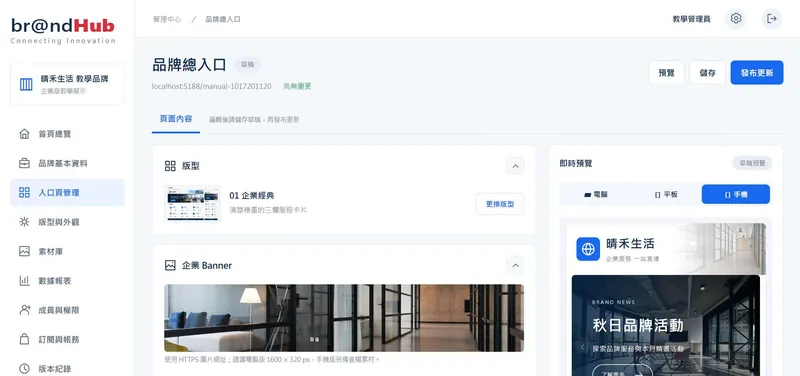
Edit and preview before going live. Prepare the next campaign while your published services keep running.
The draft has changed. The public page is unchanged.
BrandHub.io · Business Service Hub
Website・Store・Bookings・Support・Social・Careers
Bring the services you already use together in one branded hub.
Share one link. Help customers find the right service, faster.
01 / Why BrandHub
Each platform works on its own, but customers still have to find their way between links. Your team maintains each URL, campaign and version separately. Compare the experience before and after BrandHub.
A social profile points to your website, which points to your store and booking tool. Customers keep searching, and support keeps sharing the same links.
Put every service behind one branded link for social profiles, business cards and posters.
Names, logos and campaign images change at different times across platforms. Customers may wonder whether they belong to the same brand.
Manage your logo, brand color, banners and story centrally, with a consistent experience on desktop and mobile.
Your posters and packaging are already printed when a booking tool or store moves. The old QR destination stops working.
Keep a fixed service code and QR link. Update the destination when you change systems, without reprinting the code.
Several people edit the live page, exposing unfinished content or incorrect links immediately.
Keep drafts separate from the public page. Authorized team members preview and publish, with earlier versions available to restore.
An anniversary sale or hiring campaign ends, but its promotion remains on the page because someone forgot to remove it.
Set a start and end time for each campaign. Published campaigns appear and disappear according to schedule.
A post gets attention, but you cannot tell which service people actually use or where those visitors come from.
Review Home Page Views (PV), Unique Home Visitors (UV), service clicks, sources and devices. Export CSV data to guide your next update.
02 / How it works
Customers reach one branded hub from any touchpoint, then continue to your existing services. Transactions, bookings and registrations still happen in those external systems.
Share one branded URL or QR code across your channels.
Present your brand, campaigns and service links together, and record page views and clicks.
Keep them running. No migration or rebuild required.


03 / Features
Try the interactive demos: edit a title, publish, restore a version, change a date or switch booking systems. These examples run only in this page.
Edit and preview before going live. Prepare the next campaign while your published services keep running.
The draft has changed. The public page is unchanged.
Each publication records a note, time and author. Bring an earlier version back into the draft, or restore it directly to the public page.
Select an earlier version to try restoring it.
Set campaign start and end times in advance. The public page shows campaigns only during their scheduled period.
10/23 On the public page:Autumn Brand Campaign, Anniversary Sale
Keep the service code, update the destination and publish. Printed QR codes continue to lead to the latest service.
brandhub.biz/your-brand/go/booking
Destinationold-booking.example.com
Fixed QR links depend on keeping the same domain, brand code and service code.
Use a dedicated brand URL for a consistent, recognizable destination that customers can trust.
Planned enterprise feature. DNS, domain verification, HTTPS certificates and brand routing still need to be implemented. Custom domain binding is not available yet.
04 / Templates
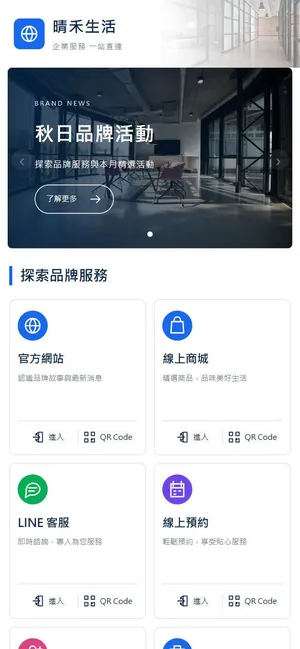
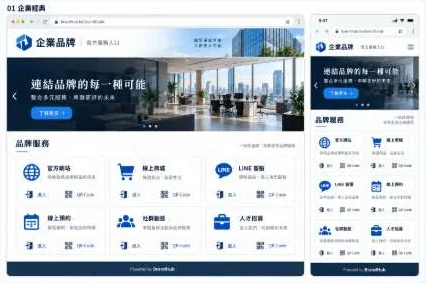
All templates share the same brand and service data. Switch the look without rebuilding your content, on desktop and mobile.
05 / Analytics
Service Click-through Rate counts unique visitors who both viewed the home page and clicked the service, within the same period and shared filters. Ten clicks by one visitor still count as one visitor.
These are 10 unique home visitors. Select a visitor to add a click on the Online Store:
3 ÷ 10 × 100% A click is not a sale or a completed booking. It measures the journey from your hub to a service.
06 / Roles
Editors prepare drafts; Owners or Admins review and publish. Media uses random identifiers, and unpublished media is available only to members of the brand.

| Features | Owner | Admin | Editor | Viewer |
|---|---|---|---|---|
| Edit and save drafts | Yes | Yes | Yes | — |
| Upload media | Yes | Yes | Yes | — |
| Publish and restore | Yes | Yes | — | — |
| View analytics | Yes | Yes | Yes | Yes |
| CSV export | Yes | Yes | — | — |
| Manage members | Yes | — | — | — |
07 / Use cases
Bring your store, membership information, support and social channels together. Schedule promotions centrally and use fixed QR links on packaging and at the counter, even if your store moves.
For consultants, education providers and other service brands: organize service information, external booking and registration links, and contact options. Use click analytics to refine the order of your services.
Share one destination on business cards, exhibition materials and company introductions: your company, products, sales contacts, social channels and careers. Teams contribute; authorized members publish.
08 / Onboarding
Start with one brand hub and a few important services. Confirm your maintenance process and customer journey before adding more campaigns and promotion channels.
List your external services, owners, promotion channels and existing QR codes.
Choose a template, then add your logo, images, brand color, services and campaigns.
Assign Owner, Admin, Editor and Viewer roles, then publish your first version.
Test fixed service links, promotion UTM parameters and destination sites.
Check page views, unique visitors, service clicks, click-through rates and exports.
Set up HTTPS, backups, monitoring and clear handover responsibilities.
09 / FAQ
For more detail, ask for the BrandHub.io service white paper.
BrandHub.io is a branded hub for your external services. Bring your website, store, booking tool, support, social channels and careers into one recognizable page, and manage its content, campaign schedules, fixed QR links and visitor analytics from one place.
No. BrandHub organizes the entry points and records interactions. Transactions, registrations, bookings and inquiries still take place in your existing systems. Add their current URLs to your brand hub.
Yes. Set a fixed service code, such as booking, and print the platform's fixed service URL as a QR code. When you change systems, update the destination and publish. The QR link continues to work as long as its public domain, brand code and service code remain unchanged.
No. Drafts and published content are stored separately. Customers see the published version. Editors can save drafts, while Owners or Admins preview and publish. Each publication records a note, time and author.
Yes. Published versions are saved as snapshots. Restore one into the draft for review before publishing, or restore it directly to the public page with a restoration note.
Service Click-through Rate = unique visitors who both viewed the home page and clicked that service, within the same period and shared filters, divided by Unique Home Visitors (UV) × 100%. Count each anonymous visitor ID once across the full period, including repeat clicks and multiple days. Missing IDs do not count; if UV is zero, show —. For example, 3 of 10 home visitors clicking the store gives 30.0%. This measures a service click, not a sale or completed booking. Selecting a service does not narrow the home-visitor denominator. Results range from 0–100% and are shown to one decimal place. Anonymous visitor counts are estimates, not verified people.
Yes. Each campaign carousel item supports desktop and mobile images, a destination URL, and start and end times. Publish it in advance, and the public page shows it only during its scheduled period.
Custom domain binding is a planned enterprise feature, for example hub.yourbrand.com.tw. It requires DNS, domain verification, HTTPS certificates and brand routing. It is not available yet; release conditions remain to be confirmed.
A brand currently supports up to 30 service links and 10 campaigns, with a 100 MB media library and a 4 MB limit per file.
Connecting Innovation
Tell us which services your brand uses. We will help you plan your first branded hub.
Or email us at jdyu.taiwan@gmail.com